Multistream to every platform at once. One stream, 30+ destinations.

One stream in. 30+ platforms out. No re-encoding, no extra uploads.

Start free - then plans starting from $15/month

Trusted by broadcasters, media teams, and enterprises

LIVE
1,200 VIEWERS
Live
520 viewers
LIVE
YouTube
480 viewers
LIVE
Facebook
200 viewers
LIVE
Twitch

What is multistreaming?

Multistreaming means broadcasting one live video feed to multiple platforms at the same time. Instead of choosing between YouTube, Facebook, and Twitch, you send a single stream to Livepush and it simultaneously relays that stream to every destination you have connected.

Your encoder, whether that is OBS, vMix, or a hardware device, only ever sends one upload. Livepush handles the distribution. Your full audience across every platform watches the same broadcast at the same time, with no extra upload cost or encoder complexity on your end.

Your stream
YouTube Facebook Twitch TikTok LinkedIn Kick
+30
One stream in, 30+ platforms out
Your encoder sends one RTMP or SRT stream. Livepush fans it out to every platform you have enabled.
No re-encoding on your side
Livepush relays your stream as-is. The quality each platform delivers to viewers depends on your source bitrate, not extra processing.
Works with any encoder or workflow
OBS, vMix, Wirecast, Zoom, and hardware encoders all work. If it supports RTMP or SRT, it works with Livepush.

Who uses Livepush to multistream

Churches, sports clubs, podcasters, news teams, businesses, and creators all go live on multiple platforms at once with Livepush.

Trusted by broadcasters, media teams, and enterprises

Churches & worship communities

Stream Sunday services to Facebook Live, YouTube, and your church website from one Livepush feed. See church streaming →

Facebook YouTube

Sports clubs & leagues

Broadcast match day to YouTube, Facebook, and Twitch at once from your camera, OBS, or stream key.

YouTube Facebook Twitch

Podcasters & talk shows

Go live on YouTube, Twitch, and LinkedIn while you record every episode.

YouTube Twitch LinkedIn

News & media teams

Push breaking coverage to every social channel and your branded player from one live feed.

YouTube Facebook Twitch LinkedIn

Businesses & brands

Run launches, webinars, and all-hands meetings across YouTube, LinkedIn, and private destinations.

YouTube LinkedIn

Content creators & streamers

Stream to Twitch, YouTube, TikTok, Kick, and everywhere else from one setup.

Twitch YouTube TikTok Kick

Connect any encoder with RTMP or SRT

Livepush accepts streams from OBS, vMix, Wirecast, Zoom, and any hardware encoder. Plug in your stream key once and your feed flows to every destination from there.

  • OBS, vMix, Wirecast, Zoom, and StreamYard all supported
  • RTMP for compatibility, SRT for low-latency ingest
  • No reconfiguration when you add or change platforms
OBS
vMix
Zoom
Wirecast
StreamYard
ecamm
RTMP
SRT
+ Any encoder

15 regional ingest points for stable uploads

Pick the ingest server closest to your setup. Livepush runs points across the US, Europe, and Asia so your encoder always has a low-latency path before the stream fans out to every platform.

  • 15 ingest locations across North America, Europe, and Asia
  • Closer ingest means a more stable bitrate to every platform
  • Switch regions from your dashboard, no encoder change needed
stream.livepush.io Auto-detect

One stream to 30+ platforms at the same time

Send one feed to Livepush and go live on YouTube, Facebook, Twitch, TikTok, Kick, LinkedIn, and 30+ other platforms simultaneously. No extra uploads, no re-encoding on your side.

  • YouTube, Facebook, Twitch, TikTok, Kick, and 30+ more
  • Toggle destinations on or off mid-stream without restarting
  • One upload, no extra bandwidth cost per platform
Live destinations 0 active

Stream to any custom RTMP or SRT endpoint

Not every destination has a native integration. Add any custom RTMP or SRT endpoint directly in your dashboard: private video platforms, CDN outputs, church streaming tools, or enterprise video systems.

  • Add any URL and stream key as a custom destination
  • Private platforms, CDNs, and enterprise systems supported
  • Mix custom endpoints with native integrations freely
Add destination

All your platform chats in one window

Monitor and respond to comments from Facebook, YouTube, and Twitch in a single dashboard view. Stay connected to your full audience without switching tabs mid-stream.

  • Facebook, YouTube, and Twitch chat merged into one feed
  • Color-coded by platform so you always know who's talking
  • Viewer count per platform visible alongside the unified feed
12.4K
4.2K
1.8K
18.4K

Embed a live player directly on your website

Keep viewers on your own domain with a CDN-powered embeddable player. Control branding, playback, and access while your stream delivers through Akamai infrastructure.

Learn more about the embeddable player →
  • Single iframe or JS snippet, works on any website or CMS
  • Akamai CDN delivery with domain lock and secure playback
  • Your colors, logo, and branding, no Livepush watermark
thelisteningroom.fm/live
LIVE
3,241
LIVE
Living Room Sessions: Acoustic Night

An intimate evening of music โ€” one guitar, a few friends, and a room full of warmth.

Brand the player with your logo and overlays

Add your logo, sponsor watermarks, or a custom starting poster to the embedded player. Every viewer sees your brand, not a generic streaming interface.

  • Upload a logo or watermark that stays on the video
  • Set a branded starting poster before your stream begins
  • Sponsor banners and overlays configurable per event
Player overlays
My Live Event Title
We are starting soonโ€ฆ stay tuned!

How to set up multistreaming with Livepush

Three steps: connect your encoder, add your streaming destinations, and optionally embed a player on your own site. Most users are live within five minutes.

Connect your encoder
Add streaming platforms
Watch on embed player

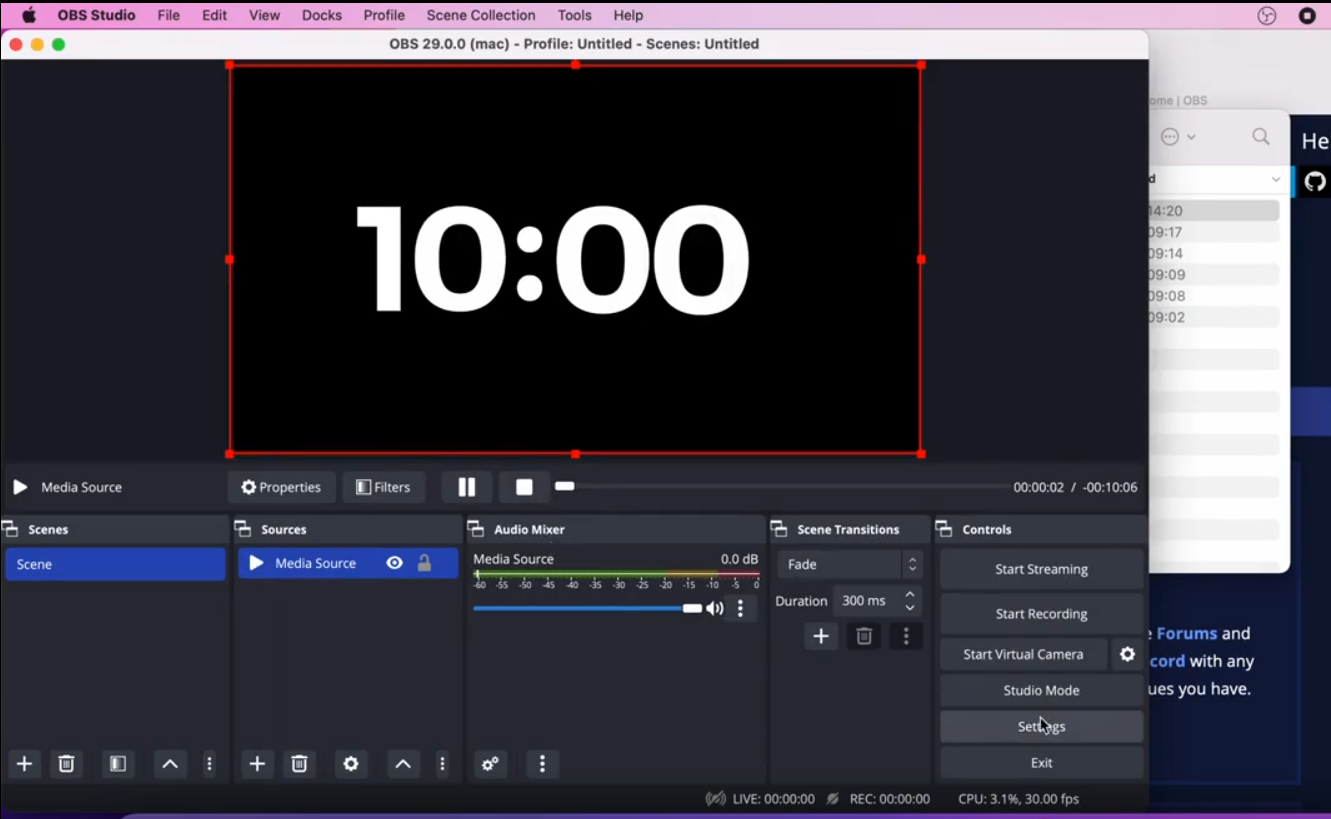
Copy your Livepush stream key and paste it into OBS, Streamlabs, vMix, or any hardware encoder. Choose RTMP for broad compatibility or SRT for ultra-low-latency setups. Both work out of the box.

Watch video: how to connect OBS to Livepush with RTMP/SRT

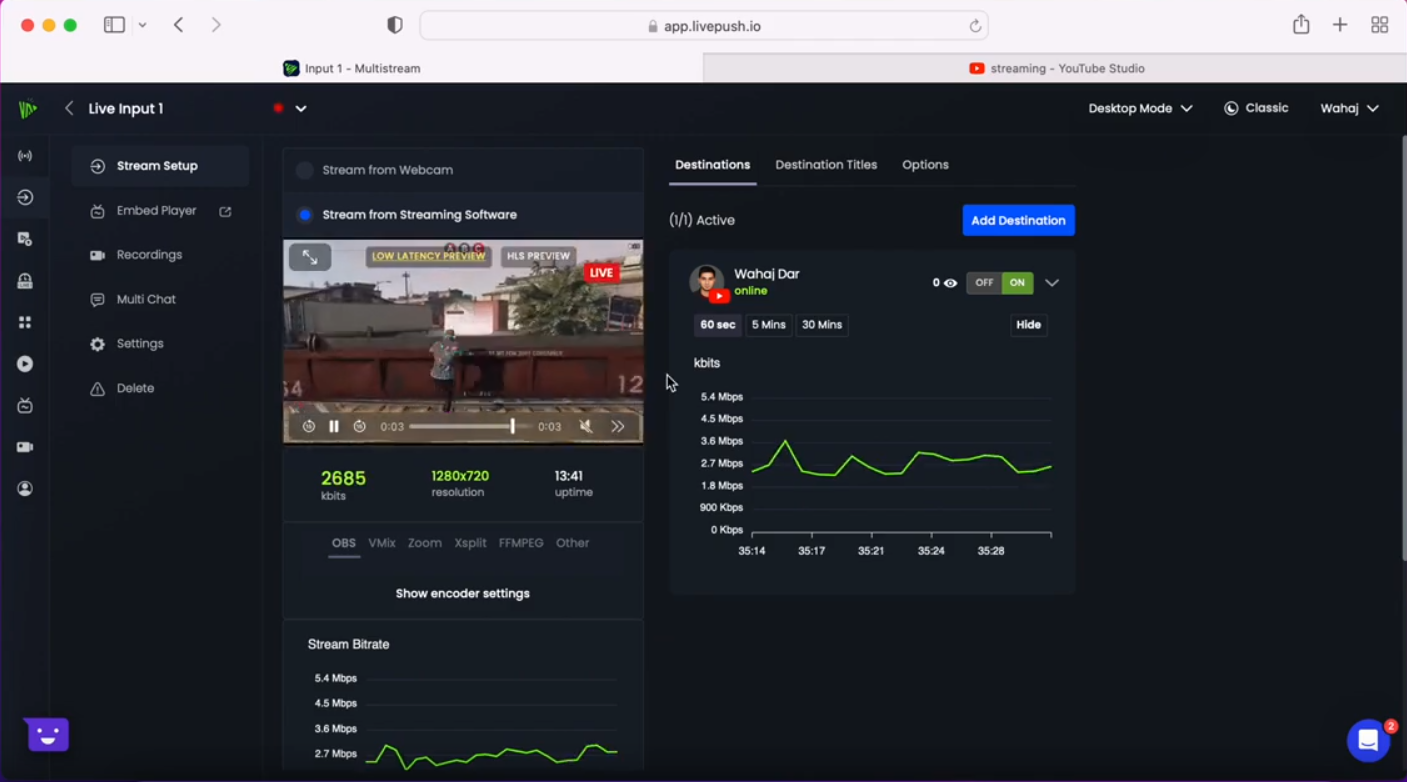
Link Facebook, YouTube, TikTok, Twitch, and any other platform directly from the dashboard. Add as many destinations as your plan allows, including custom RTMP and SRT endpoints. When you go live, Livepush fans your stream out to all of them at once.

Watch video: multistream to YouTube, link Google account and set up live events in Livepush

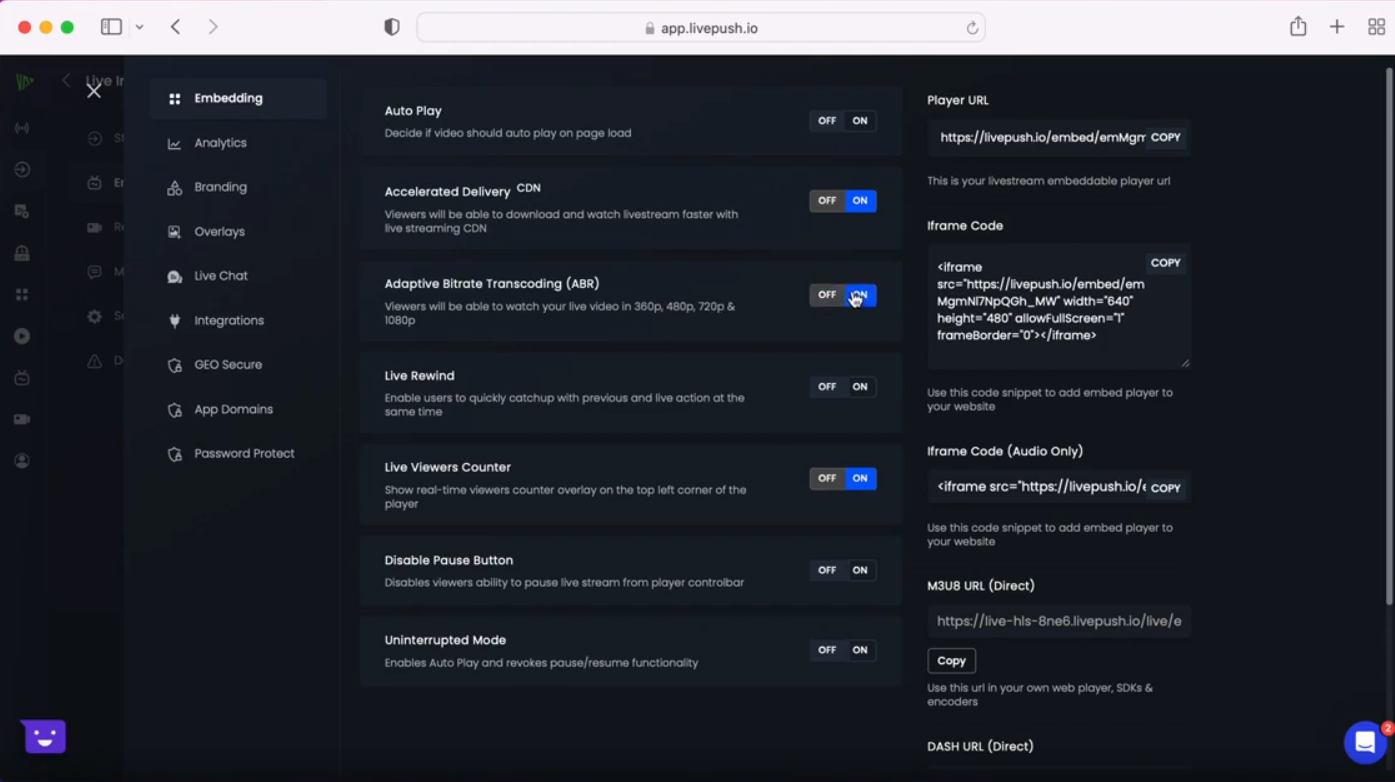
Beyond social platforms, Livepush gives you a hosted player you can embed on any website. Copy the embed code, paste it on your page, and your stream delivers through Akamai CDN with domain lock and secure playback, keeping your audience on your own domain.

Watch video: how to embed a live stream player on your website

Start free. No credit card required.

Try Livepush free

Simple, transparent pricing.

Trusted by broadcasters, media teams, and enterprises

Free 20 hrs per month, included

No credit card. No time limit.

Start free

What our customers say

Reviewed on Trustpilot and Capterra by streamers, broadcasters, and teams worldwide.

Go live today. No setup required.

Join thousands of streamers, broadcasters, and communities already on Livepush.

Frequently asked questions

Have more questions? Visit our Help Center.

Getting started

What is multistreaming?
Multistreaming means sending your live stream to multiple platforms at the same time from a single source. You set up your encoder once, send one stream to Livepush, and Livepush simultaneously distributes it to Facebook, YouTube, TikTok, Twitch, and 30+ other destinations. No extra upload, no re-encoding on your side.
What encoder do I need to multistream?
Any software or hardware encoder that supports RTMP or SRT works with Livepush. OBS Studio is the most popular choice and is completely free. You can also use Streamlabs, vMix, Wirecast, Zoom, or any hardware encoder. Just paste your Livepush RTMP/SRT URL and stream key into your encoder settings, and you are ready to go.
How quickly can I start multistreaming?
Most users are live within five minutes. Sign up free, connect your platforms in the dashboard, copy your ingest URL and stream key into OBS or your encoder, and hit go. No credit card required for the free plan.
What is the cheapest plan to stream to Facebook and YouTube at the same time?
The Pro plan at $15/month (or $13/mo billed annually) lets you stream to both Facebook and YouTube simultaneously, along with 28+ other platforms. The free plan supports streaming but Facebook is not included in the free plan, so Pro is the entry point for Facebook multistreaming.
Is Facebook streaming included in the free plan?
No, Facebook is not included in the free plan. To stream to Facebook, you need a paid plan starting from Pro at $15/month. YouTube and Twitch are available on the free plan alongside the free plan's included platforms.

Platforms and destinations

Which platforms can I multistream to?
Livepush supports 30+ platforms including YouTube, Facebook, Instagram, TikTok, Twitch, X (Twitter), LinkedIn, Kick, Rumble, and more. You can also add any custom RTMP or SRT destination, such as a CDN, a private server, or a platform not in our list.
Can I stream to multiple YouTube channels at the same time?
Yes. You can connect multiple YouTube channels to your Livepush account and stream to all of them simultaneously. Each connected channel counts as one destination. The number of destinations available depends on your plan.
Can I stream to multiple Facebook pages at the same time?
Yes. You can connect multiple Facebook pages or groups and stream to them at the same time. Each Facebook page you add counts as one destination toward your plan limit.
Can I turn platforms on or off while I am live?
Yes. You can enable or disable individual destinations mid-stream from the Livepush dashboard without interrupting the platforms that are still active. This is useful if you want to drop one platform partway through a stream while continuing on others.
Can I add a custom RTMP or SRT destination?
Yes. Pro plan and above includes at least one custom RTMP destination. Higher plans include more. You can point a custom destination at any streaming endpoint: a CDN, a private media server, another streaming service, or a hardware device that accepts RTMP/SRT input.
Does multistreaming affect video quality on each platform?
No. Livepush relays your stream as-is to each platform. The quality viewers see is determined by the bitrate and resolution you send from your encoder. Each platform receives the same stream you uploaded, without any additional compression from Livepush.

Multichat

What is multichat?
Multichat pulls live chat messages from all your connected platforms into one unified view. Instead of jumping between tabs to read YouTube comments, Facebook comments, and Twitch chat separately, you see everything in one place. You can also send it as an OBS browser source so chat appears directly in your stream overlay.
Which platforms are supported in multichat?
Multichat currently supports Facebook, YouTube, and Twitch. These platforms provide the APIs needed to read and display live chat in real time. Other platforms may be added in the future.
Will multichat work if I use a stream key instead of connecting my account?
No. Multichat requires an authenticated account connection to read messages from each platform's API. If you stream to Facebook, YouTube, or Twitch using a stream key only (without linking your account), Livepush cannot access the chat for that platform. To use multichat, link your platform accounts in the Livepush dashboard.
Can I display multichat in OBS?
Yes. Livepush generates a browser source URL you can add directly to OBS. This displays the combined chat feed as an overlay on your stream. You can customise the font, size, and colours to match your stream design.

Technical

What is the difference between RTMP and SRT?
RTMP is the most widely supported streaming protocol and works with virtually every encoder and platform. SRT (Secure Reliable Transport) is a newer protocol designed for lower latency and better performance on unstable or high-latency internet connections. Both are supported by Livepush. Use RTMP for simplicity; use SRT if you are streaming over a congested or long-distance network.
Which ingest region should I choose?
Choose the ingest region geographically closest to where your encoder is located. Livepush offers multiple regional ingest points. A closer region reduces upload latency and gives you a more stable connection between your encoder and our servers, which means fewer dropped frames.
Does Livepush re-encode my stream?
For multistreaming to social platforms, Livepush passes your stream through without re-encoding, so no quality is lost and no extra processing delay is added. If you need to change resolution, bitrate, FPS, or orientation (including landscape to portrait) before it reaches your platforms, Livepush offers cloud transcoding as an add-on. You configure the output settings in the dashboard and the transcoder re-encodes your stream in the cloud before distribution.
What upload speed do I need to multistream?
You only need enough upload bandwidth for one stream to Livepush, regardless of how many platforms you are streaming to. For 1080p at 30fps, a stable 6-8 Mbps upload is sufficient. Livepush handles the distribution from our servers, so your bandwidth requirement does not increase with more destinations.

Plans and pricing

Is there a free plan?
Yes. The free plan lets you stream to up to 3 platforms simultaneously for 20 hours per month. No credit card required. Note that Facebook is not included on the free plan, so if you need Facebook you will need a paid plan.
How much does Livepush multistreaming cost?
Plans start free. The Pro plan is $15 per month (or $13/mo billed annually) and covers most individual streamers, giving you unlimited streaming hours, Facebook access, and 30+ platform destinations. The Creators plan at $39/mo adds 24/7 scheduling and 4K output. The Business plan at $119/mo is built for organisations managing multiple channels at scale. See the full breakdown on the pricing page.
Can I try Livepush before paying?
Yes. The free plan is fully functional with no time limit and no credit card needed. You get 20 streaming hours per month to test the full multistreaming workflow before deciding whether to upgrade.
Do you offer annual billing?
Yes. Paying annually saves around 15% compared to monthly billing. The annual price is shown on each plan card at the top of the pricing page. You can switch between monthly and annual before subscribing.