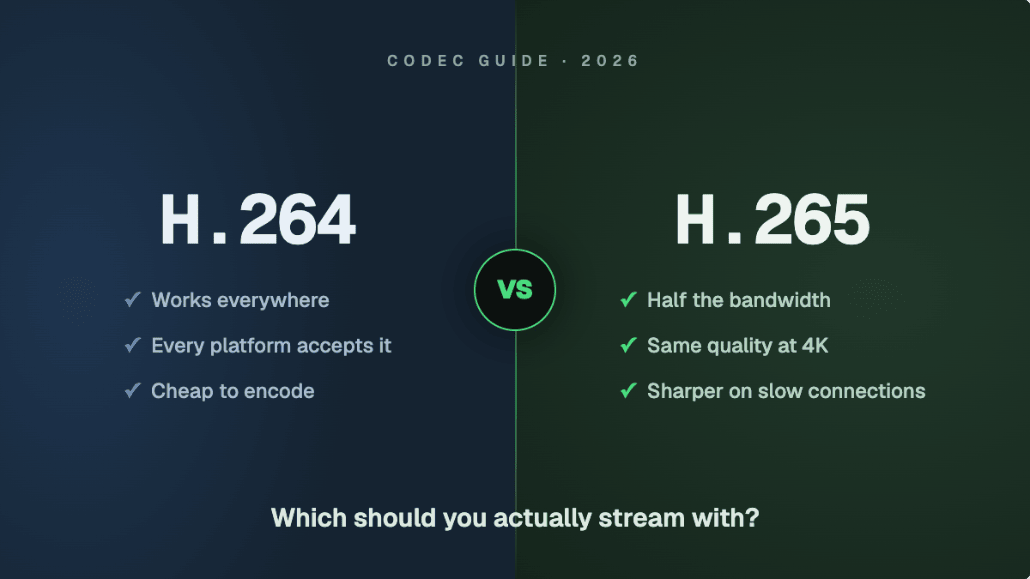
H.264 vs H.265 sounds like a debate for video engineers, but it shows up in a very ordinary place: the encoder dropdown in OBS. Pick one and your stream works everywhere. Pick the other and you might get the same quality for half the bandwidth, or a platform that rejects your stream outright. This guide explains what each codec actually does, what H.265 genuinely saves, which platforms accept it for live ingest in 2026, and what you should actually select before you go live.
What a Codec Actually Does (The 30-Second Version)
A codec (coder-decoder) is the compression system that shrinks video down to a size you can actually send over the internet. Raw 1080p60 video is around 3,000,000 Kbps. Your upload connection might carry 6,000 Kbps. The codec's job is to close that gap: the encoder on your PC compresses each frame before sending, and a decoder on every viewer's device unpacks it for playback.
Think of it like packing a suitcase. The clothes (your video) stay the same; a better packing method fits them into a smaller case. H.264 is the packing technique everyone learned years ago. H.265 packs the same clothes into a case roughly half the size, but it takes more effort to pack, and not every airport (platform) accepts that suitcase at check-in.
Two more terms you'll see throughout:
- Bitrate: how much data per second your stream uses, measured in Kbps. This is the "size of the suitcase". Our bandwidth guide covers how to pick a bitrate your connection can sustain.
- Hardware encoder: a dedicated chip on your GPU (NVIDIA NVENC, AMD AMF, Intel Quick Sync, Apple VideoToolbox) that does the compression work so your CPU doesn't have to.
H.264 (AVC): The Codec That Runs the World
H.264, also called AVC (Advanced Video Coding), was standardized in 2003 and is still the most widely supported video codec ever made. That longevity is not an accident, and it is exactly why it remains the default answer for live streaming:
- Every device decodes it. Phones, browsers, smart TVs, consoles, ten-year-old laptops. There is no playback situation where H.264 fails.
- Every encoder has hardware for it. Any GPU or laptop chip from the last decade encodes H.264 with near-zero performance cost.
- It is the ingest standard. Twitch, Facebook, Kick, and standard YouTube RTMP all expect H.264 coming in. When a platform publishes "recommended encoder settings", it is describing an H.264 stream.
- Every tool speaks it. OBS, vMix, hardware encoders, phone apps, drones. The whole ecosystem was built around it.
The cost of that universality: H.264 is a 20-year-old compression technique. It needs relatively high bitrates to look good, which is why 1080p60 wants 6,000 Kbps and why 4K over H.264 gets expensive fast, as we cover in the high definition streaming guide.
What Is HEVC? The H.265 Pitch and the Catch
H.265, better known as HEVC (High Efficiency Video Coding), is H.264's official successor, finalized in 2013. The pitch is simple and real: the same visual quality at roughly 25–50% less bitrate. It achieves this with smarter compression: it can analyze much larger areas of the frame at once and describe motion more precisely, so it wastes fewer bits repeating information.
For a streamer, that efficiency translates directly. A 1080p60 stream that needs 6,000 Kbps in H.264 can look equivalent at 3,000–4,000 Kbps in HEVC. Flip it around and the same 6,000 Kbps buys you visibly better quality, which matters most at 1440p, 4K, and HDR where H.264 runs out of steam.
So why isn't everything HEVC? Two catches:
- The patent licensing mess. H.264's licensing was cheap and predictable. HEVC's patents ended up split across multiple pools with unclear and expensive terms, so browser vendors and web platforms largely refused to adopt it for the open web. Devices (iPhones, TVs, GPUs) licensed it; the web mostly didn't. This is the single biggest reason HEVC never became the universal replacement.
- Playback support is fine; live ingest support is narrow. Nearly every modern device can decode HEVC. But live platforms have to accept it, transcode it, and deliver it to every viewer, so most of them simply kept their ingest at H.264. That's the part that actually decides what you can stream with, and we'll map it in a moment.
HEVC vs H264: The Bitrate Savings in Real Numbers
Here is what the efficiency gap looks like at common streaming tiers. These are equivalent-quality estimates for typical content; high-motion gameplay sits at the top of each range.
| Scenario | H.264 bitrate | H.265 (HEVC) bitrate | Typical saving |
|---|---|---|---|
| 1080p 30fps | 4,500–6,000 Kbps | 2,500–3,500 Kbps | ~35–40% |
| 1080p 60fps | 6,000–8,000 Kbps | 3,000–4,500 Kbps | ~40% |
| 1440p 60fps | 9,000–13,000 Kbps | 6,000–9,000 Kbps | ~30–35% |
| 4K 30fps | 20,000–35,000 Kbps | 12,000–23,000 Kbps | ~35–40% |
| 4K 60fps | 30,000–50,000 Kbps | 20,000–35,000 Kbps | ~30–35% |
HDR at 4K is HEVC only on YouTube (AV1 is not supported for HDR), so there is no H.264 HDR column to compare.
Two honest qualifiers. First, the savings grow with resolution: HEVC's advantage at 4K is dramatic, at 720p it's modest. Second, if your upload connection already carries 6,000 Kbps comfortably and your platform caps you there anyway, HEVC's savings buy you quality headroom, not a smaller bill. The people who benefit most are those pushing 4K or HDR, and those on constrained uploads.
The Live Streaming Reality: Who Accepts HEVC Ingest in 2026?
This is where the H.264 vs H.265 decision actually gets made. It doesn't matter how efficient your codec is if the platform refuses the stream at the front door. Here is the live ingest picture as of 2026:
| Platform | H.264 ingest | HEVC ingest | AV1 ingest | Notes |
|---|---|---|---|---|
| YouTube | Yes | Yes (enhanced RTMP or HLS ingest) | Yes (enhanced RTMP) | The most codec-friendly platform; HEVC over RTMP(S), or HLS ingest as a fallback, is the path for HDR |
| Twitch | Yes | Partial (Enhanced Broadcasting only) | Not generally available | Standard RTMP ingest is still H.264 at up to 6,000 Kbps; Enhanced Broadcasting allows 7,500 Kbps at 1080p and 9,000 Kbps at 1440p |
| Facebook Live | Yes | No | No | H.264 only (Level 4.1/4.2), up to 6,000 Kbps at 1080p30 and 9,000 at 1080p60 |
| Kick | Yes | No | No | H.264 only, though with a more generous bitrate allowance |
| Custom RTMP/SRT services | Yes | Varies | Varies | Depends entirely on the server; check before you switch |
The details worth knowing:
- YouTube is furthest ahead. It added HEVC and AV1 live streaming over enhanced RTMP back in 2023 (OBS 29.1 and newer support it natively), and YouTube now recommends HEVC over RTMP(S) for HDR, with its HLS ingest as the fallback for encoders that cannot do HDR over RTMP. Either way, HDR live streaming to YouTube effectively requires HEVC (AV1 is not supported for HDR). If you want to stream 4K or HDR live today, YouTube plus HEVC is the one mainstream pipeline that fully works.
- Twitch never opened its standard ingest beyond H.264. What it built instead is Enhanced Broadcasting, where OBS encodes multiple renditions on your GPU and sends them together. Within that system, H.264 multi-encode is generally available, HEVC is available to Partners and Affiliates for 1440p (up to 9,000 Kbps) and 7,500 Kbps at 1080p since June 2026, and AV1 and 4K are not generally available; the 2026 rollout covers H.264 and HEVC only. Outside Enhanced Broadcasting, sending Twitch anything but H.264 gets you rejected.
- Facebook and Kick are the simple cases: H.264 in, no exceptions documented. If these are your destinations, the codec debate is already settled.
The Encoding Cost: Does H.265 Make Your PC Work Harder?
HEVC's smarter compression takes more computation. Encoded in software on your CPU (x265), it is several times heavier than x264, enough that software HEVC is impractical for live streaming on normal hardware. Don't do it.
Hardware encoders change the math completely. If your chip has a dedicated HEVC encoding block, the work happens there and the impact on your games and apps is essentially the same as H.264:
- NVIDIA NVENC: HEVC encoding on GTX 10-series and newer, mature and excellent on RTX cards.
- Apple VideoToolbox: every Apple Silicon Mac encodes HEVC efficiently; it's the same engine iPhones have used for years.
- AMD AMF and Intel Quick Sync/Arc: HEVC encoding on all recent generations.
So the practical question isn't "can my PC handle H.265" but "does my encoder chip support it". In OBS, if you see an option like "NVENC HEVC" or "Apple VT HEVC", you have hardware support. The rest of your encoder configuration (rate control, keyframes, presets) carries over almost unchanged from the best OBS settings for 1080p.
AV1 vs H265: The Royalty-Free Wildcard
While H.264 and H.265 fight it out, a third codec is quietly winning the long game. AV1 was built by the Alliance for Open Media (Google, Amazon, Netflix, Apple, and others) with one explicit goal: better compression than HEVC with no patent royalties. That second part matters more than it sounds, because licensing is precisely what kept HEVC off the open web.
Where AV1 stands as of 2026:
- Compression: roughly 20–30% more efficient than HEVC, and around 50% better than H.264 at the same quality.
- Encoding hardware: AV1 encoders ship on NVIDIA RTX 40-series and newer, Intel Arc GPUs, and AMD RX 7000-series and newer. If your GPU is older, live AV1 encoding is off the table.
- Platform support: YouTube accepts AV1 live ingest over enhanced RTMP and has for a while. Twitch's AV1 and 4K paths are not generally available; its 2026 Enhanced Broadcasting rollout covers H.264 and HEVC only. Facebook and Kick don't accept it for live ingest.
- Playback: decode support is now broad on modern phones, browsers, and TVs, though older devices rely on software decoding.
The trajectory is clear: platforms would rather invest in a royalty-free codec that beats HEVC than pay to adopt HEVC everywhere. That's why HEVC's window as a live streaming codec may end up narrower than its 13-year head start suggests. For now, treat AV1 as a YouTube-specific superpower if you own a recent GPU, and a "check again next year" item if you don't.
Which Codec Should You Pick? Scenario by Scenario
Streaming to Twitch, Facebook, or Kick        → H.264 (platform requirement)
Streaming to Twitch with Enhanced Broadcasting → H.264 base; HEVC if eligible
Streaming to YouTube at 1080p                  → H.264 (simple, zero risk)
Streaming to YouTube at 4K or HDR              → HEVC (this is what it's for)
Streaming to YouTube with an RTX 40+/Arc GPU   → AV1 worth testing
Recording locally for editing                  → HEVC (half the disk space)
Archiving finished VODs                        → HEVC or AV1 (storage savings)
Viewers on old phones or set-top boxes         → H.264 (universal decode)
Not sure                                       → H.264
The pattern: H.264 wherever compatibility decides, HEVC wherever the pipeline supports it end to end, meaning your encoder, your ingest protocol, the platform, and your viewers' devices all handle it. One weak link and you're better off with the older codec sent at a healthy bitrate. Protocol choice interacts with this too: enhanced RTMP and SRT can carry HEVC where classic RTMP historically could not, which our RTMP vs SRT vs HLS comparison covers in depth.
Multistreaming Across Codec Rules
Here's the awkward part of the 2026 landscape: the moment you stream to more than one platform, their codec rules collide. YouTube will happily take your HEVC 4K stream; Facebook on the same stream would reject it. Encoding separately per platform means duplicate GPU load and a split upload connection.
The clean solution is to send one stream and let the cloud handle the differences. With Livepush multistreaming, you send a single RTMP or SRT stream, and Livepush's servers relay it to every connected destination, so your upload cost stays at one stream regardless of destination count. And when destinations disagree about codecs or bitrate caps, cloud transcoding re-encodes your stream server-side per destination, so a single high-quality feed can satisfy an H.264-only platform and a higher-tier one at the same time, without your PC encoding anything twice.
The Honest Bottom Line
For most live streamers in 2026, the answer is still H.264. Not because it's the better codec (it isn't), but because live streaming is a compatibility game and H.264 is the only codec that wins it everywhere: every platform ingests it, every device decodes it, every encoder produces it for free.
Use HEVC where it genuinely pays: YouTube 4K and HDR streaming, local recordings, and archives. Skip it anywhere in the chain that doesn't fully support it. And keep an eye on AV1, because it fixes the licensing problem that stalled HEVC, the hardware is spreading with every GPU generation, and it is the most likely codec to make this whole article obsolete in a few years. Until then: pick H.264 in OBS, spend your saved effort on getting the bitrate right, and stream.
RTMP & SRT ingest, included free
Livepush accepts RTMP and SRT from OBS, vMix, Wirecast, and any encoder.